
GitHub sync
Connect GitHub once, then push notes to a repository as .md files and pull the latest version back.
GitHub sync is a simple way to keep a note, such as a project README or a docs page, in a repository. Push a note to publish it, and pull it to bring changes back.
Connect your GitHub account
You’ll need a personal access token (PAT) from GitHub. inkwell uses it to talk to GitHub on your behalf.
- In GitHub, create a token:
- Classic token: turn on the
reposcope (recommended). The Settings page has a link that pre-fills this for you. - Fine-grained token: under Repository permissions, set Contents to Read and write.
- Classic token: turn on the
- In inkwell, open Settings → GitHub.
- Paste the token into Personal Access Token. Use the eye icon to show or hide it.
- Enter your GitHub username (or organisation) in Default Owner / Username.
- Click Save, then Test connection. A message like “Connected — 12 repos found.” means it works, and your repositories are listed below.
Push a note to GitHub
- Open the note and click Sync with GitHub (the branch icon) in the top bar.
- Under Notes to push, the current note is ticked. Tick more notes to push several at once. You can search them by title.
- Pick a repository from the list (private ones are marked).
- Choose where the file goes:
- One note: edit the File path in repo. It defaults to
docs/<note-title>.md. - Several notes: edit the Folder prefix in repo (default
docs/). Each note is saved as<prefix>/<note-title>.md.
- One note: edit the File path in repo. It defaults to
- Optionally write a Commit message. If you don’t, inkwell uses
docs: sync "Note title" from inkwell, ordocs: sync N notes from inkwellfor several. - Click Push note (or Push N notes).
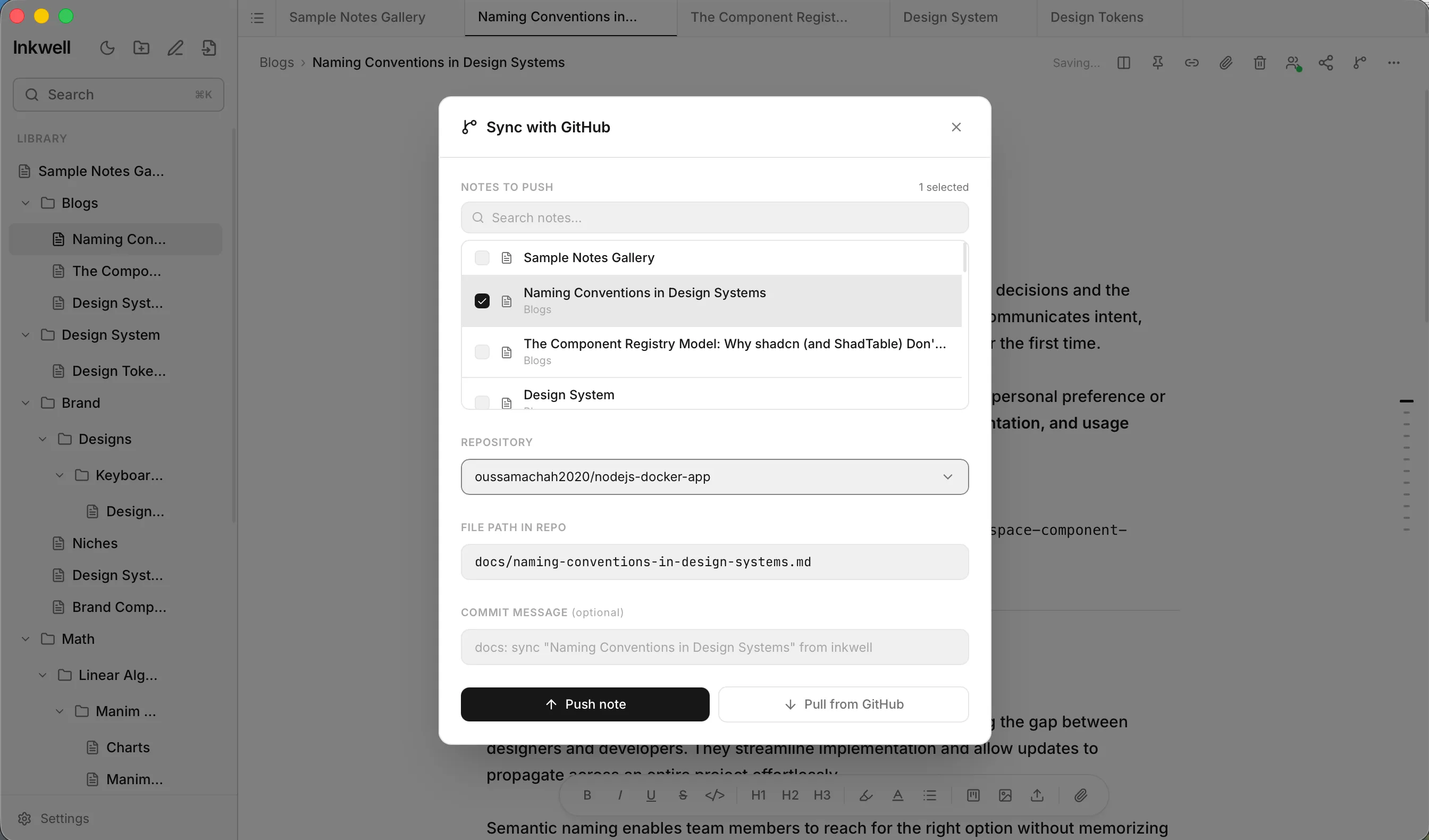
When it finishes, each note is marked as done with a link to the file on GitHub. If it fails, you’ll see why next to that note.
If the file already exists in the repository, inkwell updates it. Otherwise it creates it.
Pull the latest version
To bring a file back into a note:
- Open the Sync with GitHub window for the note.
- Make sure only that note is ticked, the repository is selected, and the File path in repo points at the file.
- Click Pull from GitHub and confirm the prompt: Replace “Note title” with the version from owner/repo/path?
The note’s text is replaced with the file from GitHub. Pulling works one note at a time.
Good to know
- Only the note’s text is pushed. Images and other attachments aren’t uploaded.
- inkwell lists your own repositories (the 50 most recently updated).
- Pushes go to each repository’s default branch.
- If a push fails with a 403 error, your token doesn’t have write access. Recreate it with the
reposcope or Contents → Read and write.